
Daffodil
Daffodil gives Python fast, lightweight 2-D data tables. A table is a list of rows, and each row is a plain Python list. Use it where data arrives and is processed row by row: reading files, building records, cleaning, reshaping, and writing them out again.
Install
pip install daffodil
Python 3.10 or later. The table code is pure Python. pandas, NumPy and a few other packages are needed only for the features that use them. See Install.
Quick start
from daffodil.daf import Daf

daf = Daf(cols=['id', 'item', 'qty'], keyfield='id')
daf.append({'id': 'a1', 'item': 'pen', 'qty': 3})
daf.append(['b2', 'ink', 10])

daf['b2']                     # the row with key 'b2'
daf[0]                        # the first row
daf[:, 'qty']                 # the qty column
daf['b2', 'qty'].to_value()   # 10
daf.select_where(lambda row: row['qty'] > 5)
print(daf)                    # a Markdown table
The Guide starts from here, and the cheatsheet has it all on one page.
The data model
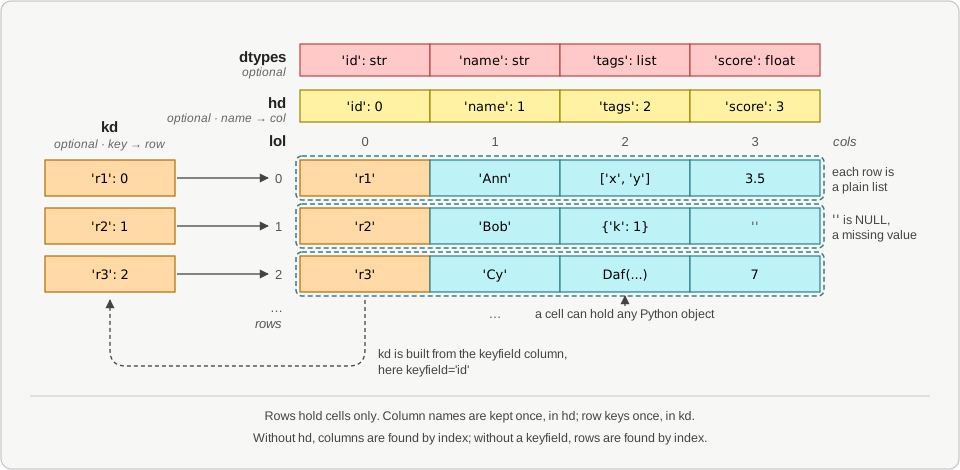
The rows are kept in lol, a list of lists. A row holds only its cells. The column names are
kept once, in the header dict hd, which maps each name to its column number. A table can
have a keyfield. Then the key dict kd maps each key to its row number, so a lookup by key
is one dict access.
A cell can hold any Python object: text, a number, a list, a dict, or even another Daf. There is no conversion on the way in or out. The data stays the Python objects you put there.
Why not pandas?
pandas stores a table as columns, in NumPy arrays. That suits heavy numeric work on columns. It costs more for data that is built and used as rows. pandas has no cheap way to add one row, so the usual pattern collects the rows in Python, then converts them all at once. Daffodil needs no conversion step.
In one benchmark, of 1,000 rows of 1,000 columns, mostly large ints:
| How the table is built | Total time | Peak memory | Kept memory |
|---|---|---|---|
pandas: collect a dict per row, then pd.DataFrame() |
543 ms | 89 MB | 8 MB |
pandas: collect a list per row, then pd.DataFrame() |
479 ms | 60 MB | 8 MB |
Daffodil: append() each row to the Daf |
173 ms | 36 MB | 36 MB |
Daffodil built the table in about a third of the time, with a lower peak. pandas kept less, because it stores these ints as 8-byte numbers. With small ints or text, both kept the same. Results depend on the values, the shape and the versions. Performance gives the details, and the script to run it again.
A selection shares the rows. Selecting rows copies no data, so it is fast. A change to a cell through the selection shows in the original. See copy().
Fewer surprises with mixed data. A column can mix text, numbers and empty cells. Nothing is coerced to NaN or to a common dtype behind your back.
When to use pandas instead
If the work is mostly math over whole numeric columns, pandas, NumPy or Polars are faster.
Daffodil converts to them when needed, with to_pandas_df() and to_numpy(). Build and
clean the data as rows in Daffodil, then hand the numeric columns over for the number crunching.
Tables larger than memory
SqlDaf stores a table in a SQLite database file, so its rows stay out of Python memory. It
supports tables larger than the memory available, and many operations run directly in SQLite.
A small selection comes into memory as a Daf with to_daf().
A Daf in memory is faster. Whole-table operations ran 2 to 6 times faster in our timings, and a lookup by key about 11 times faster. So use a Daf for a table that fits in memory.
SqlDaf has the most common Daf methods, under the same names. Some behave differently, because the data is in a database. Any other Daf method raises NotImplementedError. The guide page Tables larger than memory shows how to use it.
Next
- Getting started, then the rest of the Guide in the menu.
- Coming from pandas: the same tasks side by side.
- Daf overview, and the Daf API by section, for every method.
- SqlDaf overview, for tables in SQLite.
- Changelog, and the code on GitHub.